Follow this link
http://www.andrewconnell.com/blog/articles/UsingVisualStudioAndMsBuildToCreateWssSolutions.aspx
Friday, August 22, 2008


Manually run expiration policy jobs
using System;
using System.Collections.Generic;
using System.Text;using System.Diagnostics;
using Microsoft.SharePoint.Administration;
namespace RunExpirationPolicy
{
class Program
{
static void Main(string[] args)
{
foreach (SPService srv in SPFarm.Local.Services)
{
foreach (SPJobDefinition job in srv.JobDefinitions)
{
string jobTitle = job.Title;
if (jobTitle == "Expiration policy")
{
Trace.WriteLine("***************** Start of execution for expiration policy job"); job.Execute(Guid.Empty);
Trace.WriteLine("***************** End of execution for expiration policy job");
}
}
}
}
}}
For more info http://blogs.msdn.com/mattlind/archive/2007/06/05/force-execution-of-expiration-policies-in-moss.aspx
using System.Collections.Generic;
using System.Text;using System.Diagnostics;
using Microsoft.SharePoint.Administration;
namespace RunExpirationPolicy
{
class Program
{
static void Main(string[] args)
{
foreach (SPService srv in SPFarm.Local.Services)
{
foreach (SPJobDefinition job in srv.JobDefinitions)
{
string jobTitle = job.Title;
if (jobTitle == "Expiration policy")
{
Trace.WriteLine("***************** Start of execution for expiration policy job"); job.Execute(Guid.Empty);
Trace.WriteLine("***************** End of execution for expiration policy job");
}
}
}
}
}}
For more info http://blogs.msdn.com/mattlind/archive/2007/06/05/force-execution-of-expiration-policies-in-moss.aspx
Thursday, August 21, 2008
Monday, August 18, 2008
Feature Scope
Web (Web site)
Control
Custom Action
Custom Action Group
Hide Custom Action
List Instance
List Template
Module (File Set)
Receiver
Site (site collection)
Content Type
Content Type Binding
Control
Custom Action
Custom Action Group
Feature/Site Template Association
Field
Hide Custom Action
List Template
Module (File Set)
Workflow
WebApplication (Web application)
Control
Custom Action
Custom Action Group
Document Converter
Feature/Site Template Association
Hide Custom Action
Farm (farm)
Control
Custom Action
Custom Action Group
Feature/Site Template Association
Hide Custom Action
For more information http://msdn.microsoft.com/en-us/library/ms474383.aspx
Control
Custom Action
Custom Action Group
Hide Custom Action
List Instance
List Template
Module (File Set)
Receiver
Site (site collection)
Content Type
Content Type Binding
Control
Custom Action
Custom Action Group
Feature/Site Template Association
Field
Hide Custom Action
List Template
Module (File Set)
Workflow
WebApplication (Web application)
Control
Custom Action
Custom Action Group
Document Converter
Feature/Site Template Association
Hide Custom Action
Farm (farm)
Control
Custom Action
Custom Action Group
Feature/Site Template Association
Hide Custom Action
For more information http://msdn.microsoft.com/en-us/library/ms474383.aspx
SPSite.RootWeb.AllUsers | SiteUsers | Users - Difference
We can get list of users (SPUserCollection) based on the following objects.
SPSite.RootWeb.AllUsers
SPSite.RootWeb.SiteUsers
SPSite.RootWeb.Users
"AllUsers" - Gets the collection of users from either member of the site or or who have browsed to the site as authenticated members of a domain group in the site.
"SiteUsers - Gets the collection of all users that belong to the site collection.
"Users" - Gets the collection of user objects that are explicitly assigned permissions on the Web site.
SPSite.RootWeb.AllUsers
SPSite.RootWeb.SiteUsers
SPSite.RootWeb.Users
"AllUsers" - Gets the collection of users from either member of the site or or who have browsed to the site as authenticated members of a domain group in the site.
"SiteUsers - Gets the collection of all users that belong to the site collection.
"Users" - Gets the collection of user objects that are explicitly assigned permissions on the Web site.
SPPrincipal - SPUser - SPWeb.EnsureUser() - SPUtility.ResolvePrincipal()
SPUtility.ResolvePrincipal() method to fetch details about the user by passing "first, last name" or "user email id" or "user login id".
SPPrincipalInfo object is used to hold user details like, first name, last name, email id, login id with domain name.
SPPrincipalInfo userInfo = SPUtility.ResolvePrincipal(objWeb, "loginID", SPPrincipalType.All, SPPrincipalSource.All, null, false);
------------------------------------------------------------------------------------------------
SPWeb.EnsuerUser() will add ther user to site, if the user does not exist and return SPUser object. We can use SPUser object to update "SPUser" field type
Example:
SPUser objUser = objWeb.EnsureUser("domain\\loginname");
item["user"] = objUser;
-----------------------------------------------------------------------------------------------
SPPrincipalInfo object is used to hold user details like, first name, last name, email id, login id with domain name.
SPPrincipalInfo userInfo = SPUtility.ResolvePrincipal(objWeb, "loginID", SPPrincipalType.All, SPPrincipalSource.All, null, false);
------------------------------------------------------------------------------------------------
SPWeb.EnsuerUser() will add ther user to site, if the user does not exist and return SPUser object. We can use SPUser object to update "SPUser" field type
Example:
SPUser objUser = objWeb.EnsureUser("domain\\loginname");
item["user"] = objUser;
-----------------------------------------------------------------------------------------------
Wednesday, August 13, 2008


Tuesday, August 12, 2008
SPUtility - Usefull methods
For Example
SPUtility.SendEmail() send email from WSS site.
SPUtility.GetGenericSetupPath() used to access files 12 hive folder.
SPUtility.Redirect() used to redirect to another page.
SPUtility.TrasfertoErrorPage() helps to redirect to error page
SPUtility.TransfertoSuccessPage() helps to redirect to success page.
SPUtility.SendEmail() send email from WSS site.
SPUtility.GetGenericSetupPath() used to access files 12 hive folder.
SPUtility.Redirect() used to redirect to another page.
SPUtility.TrasfertoErrorPage() helps to redirect to error page
SPUtility.TransfertoSuccessPage() helps to redirect to success page.
Monday, August 4, 2008
Update Last Modified Date MetaData Property
// oSPListItem["Created"] = new DateTime(2007, 1, 1); // if you need to change created date
oSPListItem["Modified"] = System.DateTime.Now;
oSPListItem.UpdateOverwriteVersion();
http://msdn.microsoft.com/en-us/library/microsoft.sharepoint.splistitem.systemupdate.aspx SPListItem.SystemUpdate Method (Microsoft.SharePoint)Updates the database with changes that are made to the list item without effecting changes in the modified time or modified by fields. UpdateOverwriteVersion - you can change the settings without creating a new version. Update() will allow you to change the modified date too but if versioning is enabled it would also create a new version
Wednesday, July 30, 2008
Send Email using SharePoint Object Model
You can send email using sharepoint object model, Here is the trick
SPUtility.SendEmail(SPContext.Current.Web, false, false,"to-address@mail.com", "E-mail title","E-mail body");
SPUtility.SendEmail(SPContext.Current.Web, false, false,"to-address@mail.com", "E-mail title","E-mail body");
Tuesday, July 22, 2008
SPPersistedObject - Custom SharePoint Storage
Using SPPersistedObject, you can presist objects in database. It is similar to Property Bags. And aslo it has excellent feature ie., specify at what level the object should be presisted. for example, Farm level or Web Application level etc...
WSS Search across SiteCollection : Search Server Express 2008
By default in WSS, you cannot search across site collections without having MOSS features. for example, from Sales Site Collection you cannot search data in Marketing Site Collection.
By using Microsoft has released Search Server Express 2008 we can search across multiple site collections by without using MOSS features. Search Server Express 2008 is a free product from Microsoft.
for more information http://www.microsoft.com/enterprisesearch/serverproducts/searchserverexpress/default.aspx
By using Microsoft has released Search Server Express 2008 we can search across multiple site collections by without using MOSS features. Search Server Express 2008 is a free product from Microsoft.
for more information http://www.microsoft.com/enterprisesearch/serverproducts/searchserverexpress/default.aspx
Friday, July 11, 2008
Limited Access Permission
The Limited Access permission level is designed to be combined with fine-grained permissions to give users access to a specific list, document library, item, or document, without giving them access to the entire site. However, to access a list or library, for example, a user must have permission to open the parent Web site and read shared data such as the theme and navigation bars of the Web site. The Limited Access permission level cannot be customized or deleted.
NOTE You cannot assign this permission level to users or SharePoint groups. Instead, Windows SharePoint Services 3.0 automatically assigns this permission level to users and SharePoint groups when you grant them access to an object on your site that requires that they have access to a higher level object on which they do not have permissions. For example, if you grant users access to an item in a list and they do not have access to the list itself, Windows SharePoint Services 3.0 automatically grants them Limited Access on the list, and also the site, if needed.
NOTE You cannot assign this permission level to users or SharePoint groups. Instead, Windows SharePoint Services 3.0 automatically assigns this permission level to users and SharePoint groups when you grant them access to an object on your site that requires that they have access to a higher level object on which they do not have permissions. For example, if you grant users access to an item in a list and they do not have access to the list itself, Windows SharePoint Services 3.0 automatically grants them Limited Access on the list, and also the site, if needed.
Friday, July 4, 2008
An external storage API is available for WSS 3.0
Store SharePoint data in external device other than SQL Server
Follow this link to know more http://support.microsoft.com/kb/938499/
Follow this link to know more http://support.microsoft.com/kb/938499/
Thursday, July 3, 2008
SharePoint Versioning
Versioning enables you to track and restore the changes in SharePoint List items and files Document Library.
Major and Minor Versions
Libraries can track both Major and Minor Version. Major Version is used when new section is added and Minor version is used when spelling error is corrected.
Lists can track only major versions.
You can limit the number of versions for List and Libraries that people can Store.
Versions are created when,
Major and Minor Versions
Libraries can track both Major and Minor Version. Major Version is used when new section is added and Minor version is used when spelling error is corrected.
Lists can track only major versions.
You can limit the number of versions for List and Libraries that people can Store.
Versions are created when,
- list item or file is created or when file is uploaded
- Same file is uploaded again, enable checkbox to create new version
- Properties of list item or file is changed
- Open, edit and click save(for first time).
- File Checked Out, Changed and Checked In
Sunday, June 29, 2008
SharePoint Databases
Configuration Database (configdb)
WSS creates configdb at the time of installation. There will be only one configdb per server farm. configdb is used to store settings for Sites, Databases, Servers, Web Application
Content Databases
You can have one content database per web application, but you can span sites across multiple content databases. Content Databases is used to store site collection and its content.
Site Details, Structure Details, User Content, Files, Security Information
Shared Services Provider (SSP) Database
One SSP database created per Shared Service Provider. It is used to store User Profiles, Audience Data, Business Application Data, Excel Services Function, Site Usage Data,Infopath Foms Services session state information
Search Database
MOSS 2007 uses separate search database to store search data. It is separate from SSP database. One search database is created per SSP. Search database is used to store Search Data, History Log, Search Log, Crawl Statistics, Links tables
WSS creates configdb at the time of installation. There will be only one configdb per server farm. configdb is used to store settings for Sites, Databases, Servers, Web Application
Content Databases
You can have one content database per web application, but you can span sites across multiple content databases. Content Databases is used to store site collection and its content.
Site Details, Structure Details, User Content, Files, Security Information
Shared Services Provider (SSP) Database
One SSP database created per Shared Service Provider. It is used to store User Profiles, Audience Data, Business Application Data, Excel Services Function, Site Usage Data,Infopath Foms Services session state information
Search Database
MOSS 2007 uses separate search database to store search data. It is separate from SSP database. One search database is created per SSP. Search database is used to store Search Data, History Log, Search Log, Crawl Statistics, Links tables
Thursday, June 26, 2008

Tuesday, June 17, 2008
Master Page behaviour in MOSS and WSS
Having single master page for all the sites?
If using MOSS, you can inherit from the top level master page. If you are using WSS, the out of the box functionality is that all sites utilize their own master page. You can, however, create a site template that uses the master page you wish and create all subsequent WSS sites from your template(s).
Master Page Inheritance
Master page files can be applied on a site level, but not on a page level. So a sub site can have a different master page specified than the parent, or it can inherit the master page file settings from the parent.
Monday, June 16, 2008
Shrinking the SharePoint Content Database
When you add and remove files to your sharepoint site, you will notice that the content database will grow very large, So it will create problem for backup and site performance. We can solve this problem by shrinking the Content Database.
Step 1: goto Central Administration > Application Management > Site Collection List > click on the url for which you want to see the database name.
Step 2: goto sql server management studio and run the command "sp_helpdb
Step 3: run the sql command to backup content database "BACKUP LOG
Step 3: run the sql command to shrink the database "dbcc shrinkfile (<File Name>
For more information , Please visit these links http://blogs.officezealot.com/speaktech-bi/archive/2008/04/15/shrinking-the-sharepoint-content-database-part-1.aspx
Shrinking transaction log http://support.microsoft.com/kb/907511/en-us
Wednesday, June 4, 2008
SharePoint ProcessBatchData Method for Batch Processing
Delete List Items using Batch Process, Instead of using SharePoint API. Normally we use listItem[index].Delete(); method to delete items one by one in list. But you can use "ProcessBatchData" method to delete the list items in the form of Batch Processing.
StringBuilder sb = new StringBuilder();
sb .Append("");
foreach (SPListItem item in CurrentList.Items)
{
sb.Append("");
sb.Append("" + CurrentList.ID + " ");
sb.Append("" + item.ID.ToString() + " ");
sb.Append("Delete ");
sb.Append(" ");
}
sb.Append(" ");
try
{
SPContext.Current.Site.RootWeb.ProcessBatchData(sb.ToString());
}
catch (Exception ex)
{ throw ex; // Unable to delete}
StringBuilder sb = new StringBuilder();
sb .Append("
foreach (SPListItem item in CurrentList.Items)
{
sb.Append("
sb.Append("
sb.Append("
sb.Append("
sb.Append("
}
sb.Append("
try
{
SPContext.Current.Site.RootWeb.ProcessBatchData(sb.ToString());
}
catch (Exception ex)
{ throw ex; // Unable to delete}
Difference - Site Backup/Restore and Export/Import
Site Export and Import is used for Content Migration. The Content Migration API's are designed to migrate content from one source location to a destination location - they are not designed for backup and restore. Content Migration API has following limitations:
1. No Configuration or Application data can be exported or imported.
2. The larges object you can export is WSS web site (spWeb object)
3. Following Contents cannot be exported or imported - alerts, audit trial,change log history, checkin/checkout state, recycle bin items, recycle bin state, security state, workflow state and workflow tasks
4.Although web parts are migrated between source and destination sites, no assemblies are migrated, if you have custom web parts then you have to manually install the assemblies in the destination location
There are 3 ways to invoke content migration API's
1. using STSADM utility - you can use import and export operations to migrate data. (limited to website only)
2. you can use ExportWeb or ImportWeb methods implemented in the sites web service
3. Content Migration Object Model (Microsoft.SharePoint.Deploymen) - you can migrate anything from a website to item in a list, or a single document in a library. You can choose whether to include information about security, versioning, user roles and other metadata of the objects that you are migrating
1. No Configuration or Application data can be exported or imported.
2. The larges object you can export is WSS web site (spWeb object)
3. Following Contents cannot be exported or imported - alerts, audit trial,change log history, checkin/checkout state, recycle bin items, recycle bin state, security state, workflow state and workflow tasks
4.Although web parts are migrated between source and destination sites, no assemblies are migrated, if you have custom web parts then you have to manually install the assemblies in the destination location
There are 3 ways to invoke content migration API's
1. using STSADM utility - you can use import and export operations to migrate data. (limited to website only)
2. you can use ExportWeb or ImportWeb methods implemented in the sites web service
3. Content Migration Object Model (Microsoft.SharePoint.Deploymen) - you can migrate anything from a website to item in a list, or a single document in a library. You can choose whether to include information about security, versioning, user roles and other metadata of the objects that you are migrating
Tuesday, June 3, 2008
Visual Studio : Get Assembly Public Key Shortcut
1. In Visual Studio, select External Tools from the Tools menu.
2. In the External Tools dialog, click Add and enter Get Assembly Public Key for the
Title.
3. Fill the Command textbox by browsing to sn.exe. It is typically installed at the following
location: C:\Program Files\Microsoft Visual Studio 8\SDK\v2.0\Bin\sn.exe.
4. In the Arguments textbox, type the following (case sensitive) -Tp "$(TargetPath)".
5. Enable the Use Output window checkbox.
Click OK. The new command is added to the Tools menu.
2. In the External Tools dialog, click Add and enter Get Assembly Public Key for the
Title.
3. Fill the Command textbox by browsing to sn.exe. It is typically installed at the following
location: C:\Program Files\Microsoft Visual Studio 8\SDK\v2.0\Bin\sn.exe.
4. In the Arguments textbox, type the following (case sensitive) -Tp "$(TargetPath)".
5. Enable the Use Output window checkbox.
Click OK. The new command is added to the Tools menu.
Monday, June 2, 2008
Sharepoint limitations for acceptable performance
Guidelines for designing a server for good performance. Numbers given below is not hard limits.
Guidelines for site objects.
50,000 Site Collections per Content Database
1,50,000 Site Collections per Web Application
2,50,000 Web Sites per site Collection
2,000 Sub Sites per Web Site
5 Million Documents per Document Library
2000 Items per View
50 MB (Max 2 GB) per Document file Size
2,000 Lists per Website
256 Field Types per List
2,000 Columns per Document Library
4,096 Columns per List
50 Web Part per Page
Guidelines for people objects
2 million Users in Group per Web Site
5 Million User Profiles per Farm
2,000 Security Principal (Access Control List) per Web Site
Guidelines for search objects.
1 Search Index per Search Server
50 Million documents per Search index
guidelines for logical architecture objects.
1 Shared Service Provider for 3 Farms (max 20)
5 Zones (hard coded) per Farm
8 IIS App Pools per Web Server
50,000 Site Collection per Web App
100 Content Database per Web App
50,000 Site Collection per Database
Guidelines for physical objects.
1 Index Servers per SSP
Excel Service = No Limit
100 Content DataBase per Search server
8 Web Servers per Database Server
3 Web Servers per Domain Controller
Click here to read more click here
Guidelines for site objects.
50,000 Site Collections per Content Database
1,50,000 Site Collections per Web Application
2,50,000 Web Sites per site Collection
2,000 Sub Sites per Web Site
5 Million Documents per Document Library
2000 Items per View
50 MB (Max 2 GB) per Document file Size
2,000 Lists per Website
256 Field Types per List
2,000 Columns per Document Library
4,096 Columns per List
50 Web Part per Page
Guidelines for people objects
2 million Users in Group per Web Site
5 Million User Profiles per Farm
2,000 Security Principal (Access Control List) per Web Site
Guidelines for search objects.
1 Search Index per Search Server
50 Million documents per Search index
guidelines for logical architecture objects.
1 Shared Service Provider for 3 Farms (max 20)
5 Zones (hard coded) per Farm
8 IIS App Pools per Web Server
50,000 Site Collection per Web App
100 Content Database per Web App
50,000 Site Collection per Database
Guidelines for physical objects.
1 Index Servers per SSP
Excel Service = No Limit
100 Content DataBase per Search server
8 Web Servers per Database Server
3 Web Servers per Domain Controller
Click here to read more click here
Friday, May 30, 2008
Customization : Site Template or Site Definition?
You can choose site template or site definition for customization based on the complexity. If you have small changes, just change the look of few pages then you can go for site template.
If you have to create new content types, web parts definition and major change in site structure then you should create a site definition.
Advantages of Site Definition
- Files are stored in Web server, So performance will improve.
- We can do complex changes by editing schema.xml file
- Certain type of changes require site definition for introducing new file types,
defining view styles or modifying the Edit menu
Disadvantages of Site Definition
- more effor is required to customize site definition
- Editing Site Definition after deploying is difficult.
- Cannot apply theme through Site Definition
- User cannot create two lists of the same type.
Advantages of Site Template
- Easy to create and deploy
- Can make changes to site template, will not affect existing site
Disadvantages of Site Template
- Not suitable for large scale websites
- If there is no Base Site Definition for the Site Template, site template will not work.
If you have to create new content types, web parts definition and major change in site structure then you should create a site definition.
Advantages of Site Definition
- Files are stored in Web server, So performance will improve.
- We can do complex changes by editing schema.xml file
- Certain type of changes require site definition for introducing new file types,
defining view styles or modifying the Edit menu
Disadvantages of Site Definition
- more effor is required to customize site definition
- Editing Site Definition after deploying is difficult.
- Cannot apply theme through Site Definition
- User cannot create two lists of the same type.
Advantages of Site Template
- Easy to create and deploy
- Can make changes to site template, will not affect existing site
Disadvantages of Site Template
- Not suitable for large scale websites
- If there is no Base Site Definition for the Site Template, site template will not work.
Thursday, May 29, 2008
Enable Error Messages
You can turn off friendly error messages for the sharepoint websites. It will be helpfull at the time of development. Follow the steps to enable error message.
1. Open the web.config file from the below Url
C:\Inetpub\wwwroot\wss\VirtualDirectories\80
2. Set the "CallStack" value to "true"
<SafeMode CallStack="true" ... >
3. Set customErrors mode to "Off"
<customErrors mode="Off" >
4. Save and Close the web.config file.
1. Open the web.config file from the below Url
C:\Inetpub\wwwroot\wss\VirtualDirectories\80
2. Set the "CallStack" value to "true"
<SafeMode CallStack="true" ... >
3. Set customErrors mode to "Off"
<customErrors mode="Off" >
4. Save and Close the web.config file.
Feature Stapling - What is it?
Feature Stapling allows you to "staple" a Feature to a site definition, so that the Feature is automatically activated whenever a new site is provisioned. This means you can add your feature to all sites created using that site definition.
This helps to add functianality to Site Definitions without having to modify Site Definitions.
This helps to add functianality to Site Definitions without having to modify Site Definitions.
Visual Studio extensions for SharePoint – Developer User Guide
Microsoft has released User Guide, Samples and Walkthroughs for the Visual Studio 2005 extensions for Windows SharePoint Services 3.0, v1.1.
The user guide is downloadable from here
The user guide is downloadable from here
Planning and architecture for Windows SharePoint Services 3.0 technology
If you want to know more about planning and architecture for WSS 3.0, please visit the following link.
http://technet.microsoft.com/en-us/library/cc288426(TechNet.10).aspx
In this you can learn about,
Determine organization and user needs (Windows SharePoint Services)
Planning worksheets for Windows SharePoint Services 3.0
Plan Web site structure and publishing (Windows SharePoint Services)
Plan for content and search (Windows SharePoint Services)
Plan site and content security (Windows SharePoint Services)
Plan communication (Windows SharePoint Services)
Plan for site creation and maintenance (Windows SharePoint Services)
Plan for system requirements (Windows SharePoint Services)
Design server farms and topologies (Windows SharePoint Services)
Design logical architecture (Windows SharePoint Services)
Plan for authentication (Windows SharePoint Services)
Plan for and design security (Windows SharePoint Services)
Plan for performance and capacity (Windows SharePoint Services)
Planning and architecture for Windows SharePoint Services 3.0 technology summary
Downloadable book: Planning an Extranet Environment for Windows SharePoint Services
Plan for data protection and recovery (Windows SharePoint Services)
You can also download this from the below mentioned Url
Downloadable book: Planning and architecture for Windows SharePoint Services 3.0 technology
http://technet.microsoft.com/en-us/library/cc288426(TechNet.10).aspx
In this you can learn about,
Determine organization and user needs (Windows SharePoint Services)
Planning worksheets for Windows SharePoint Services 3.0
Plan Web site structure and publishing (Windows SharePoint Services)
Plan for content and search (Windows SharePoint Services)
Plan site and content security (Windows SharePoint Services)
Plan communication (Windows SharePoint Services)
Plan for site creation and maintenance (Windows SharePoint Services)
Plan for system requirements (Windows SharePoint Services)
Design server farms and topologies (Windows SharePoint Services)
Design logical architecture (Windows SharePoint Services)
Plan for authentication (Windows SharePoint Services)
Plan for and design security (Windows SharePoint Services)
Plan for performance and capacity (Windows SharePoint Services)
Planning and architecture for Windows SharePoint Services 3.0 technology summary
Downloadable book: Planning an Extranet Environment for Windows SharePoint Services
Plan for data protection and recovery (Windows SharePoint Services)
You can also download this from the below mentioned Url
Downloadable book: Planning and architecture for Windows SharePoint Services 3.0 technology
Wednesday, May 28, 2008
Using Formulas in Calculated Columns
Calculated Column is great feature of SharePoint 2007. Calculated columns are used in lists and Document Libraries. We can use formulas in Calculated Columns to manipulate and display the data in different formats.
Formulas can be categorised into 4 types:
1. Conditional Formulas
2. Date & Time Formulas
3. Mathemetical Formulas
4. Text Formulas
1. Conditional Formulas : we can use these formulas to test the condition of a statement and return a YES or NO value, to return blank value to represent null value.
Example,Check if a number is greater than or less than another number
=[Column1]>[Column2]
=IF([Column1]<=[Column2], "OK", "Not OK")
2.Date and time formulas: We can use these formulas to perform calculations that are based on dates and times, such as adding a number of days, months, or years to a date, calculating the difference between two dates, and converting time to a decimal value.
Note:When you manipulate dates, the return type of the calculated column must be set to Date and Time.
Example,To add a number of days to a date, use the addition (+) operator.
=[Column1]+[Column2]
Adds 3 days to 6/9/2007.Column1 value = 6/9/2007, Column2 value = 3, Result = 6/12/2007
3.Mathematical formulas: We can use these formulas to perform a variety of mathematical calculations, such as adding, subtracting, multiplying, and dividing numbers, calculating the average or median of numbers, rounding a number, and counting values.
Example,To add numbers in two or more columns in a row, use the addition operator (+) or the SUM function.
=[Column1]+[Column2]+[Column3]
4.Text formulas: We can use these formulas to manipulate text, such as combining or concatenating the values from multiple columns, comparing the contents of columns, removing characters or spaces, and repeating characters.
Example,To change the case of text, use the UPPER function.
=UPPER([Column1])
For more reference Click Here
Creating a Site Column and adding it to ContentType using Object Model
Here is an example, how to create a Site Column and add the Site Column to a Content Type.
public SPField AddField(string fieldDisplayName, SPFieldType fieldType, bool bRequired)
{
SPField field = null;
try
{
// get the parent web
SPWeb web = contentType.ParentWeb;
string fieldName = web.Fields.Add(fieldDisplayName, fieldType, bRequired);
web.Fields[fieldDisplayName].Group = "My Site Columns";
web.Fields[fieldDisplayName].Update(true);
field = web.Fields[fieldDisplayName];
// add a field link to the content type
contentType.FieldLinks.Add(new SPFieldLink(field));
contentType.FieldLinks[fieldDisplayName].Required = bRequired;
contentType.Update(true);
}
catch
{ }
return field;
}
public SPField AddField(string fieldDisplayName, SPFieldType fieldType, bool bRequired)
{
SPField field = null;
try
{
// get the parent web
SPWeb web = contentType.ParentWeb;
string fieldName = web.Fields.Add(fieldDisplayName, fieldType, bRequired);
web.Fields[fieldDisplayName].Group = "My Site Columns";
web.Fields[fieldDisplayName].Update(true);
field = web.Fields[fieldDisplayName];
// add a field link to the content type
contentType.FieldLinks.Add(new SPFieldLink(field));
contentType.FieldLinks[fieldDisplayName].Required = bRequired;
contentType.Update(true);
}
catch
{ }
return field;
}
Creating ContentType using Object Model
Here is an example, how to create an custom content type and add to custom group in Site Content Types.
SPContentType contentType = new SPContentType(
web.AvailableContentTypes["document"], web.ContentTypes,"sampleContentType");
contentType.Group = "My Content Types";
contentType.Description = "Creating Content Types using Object Model";
web.ContentTypes.Add(contentType);
SPContentType contentType = new SPContentType(
web.AvailableContentTypes["document"], web.ContentTypes,"sampleContentType");
contentType.Group = "My Content Types";
contentType.Description = "Creating Content Types using Object Model";
web.ContentTypes.Add(contentType);
Tuesday, May 27, 2008
SPSecurity.RunWithElevatedPrivileges Method
Executes set of code with Full Privilege even if the user does not having Full Privilege.
Define an anonymous method to implement. Example,
SPSecurity.RunWithElevatedPrivileges(delegate()
{
// Your Code
});
Define an anonymous method to implement. Example,
SPSecurity.RunWithElevatedPrivileges(delegate()
{
// Your Code
});
Adding Expiration Policy to SharePoint ContentType
In MOSS 2007, We can set expiration policy for a content type. For example, Document should be deleted(moved to recycle bin) from document library after certain number of days or We can associate a workflow to perform custom action.
We can achieve this in two ways
1. Using UI
Goto Site Settings > Galleries > Site Content Types
Select the ContentType for which you want to set the expiration policy and
Click 'Information Management Policy Settings'
Select the option 'Define a Policy' and Click OK, Following screen will appear.
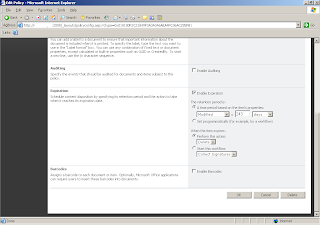
Goto 'Expiration' Section and select 'Enable Expiration' and set the time period and set the action ( what to do when item expires)
Add the ContentType to the Document Library. Add new documents to the library and bind it to our ContentType. When document expires, document will be moved to recycle bin.
2. Using Object Model (see the sample code below)
string policyFeatureId = "Microsoft.Office.RecordsManagement.PolicyFeatures.Expiration";
if (Policy.GetPolicy(contentType) == null)
{
//if the content type hasn't got a Policy yet, create a new Policy Policy.CreatePolicy(contentType, null);
}
Policy policyOfContentType = Policy.GetPolicy(contentType);
policyOfContentType.Name = "My Expiration Policy";
//Add expiration policy to the content type
if (policyOfContentType.Items[policyFeatureId] == null)
{
// Property value => 'Expiration' or 'Modified'
string customData =
@"<data><formula id=""Microsoft.Office.RecordsManagement.PolicyFeatures.Expiration.Formula.BuiltIn""><number>" + expirationDays;
customData += @"</number><property>Modified</property><period>days</period></formula>><action type=""action"" id=""Microsoft.Office.RecordsManagement.PolicyFeatures.Expiration.Action.MoveToRecycleBin"" /></data>";
policyOfContentType.Items.Add(policyFeatureId, customData);
}
Note : we cannot add expiration policy to the core content types.
We can achieve this in two ways
1. Using UI
Goto Site Settings > Galleries > Site Content Types
Select the ContentType for which you want to set the expiration policy and
Click 'Information Management Policy Settings'
Select the option 'Define a Policy' and Click OK, Following screen will appear.

Goto 'Expiration' Section and select 'Enable Expiration' and set the time period and set the action ( what to do when item expires)
Add the ContentType to the Document Library. Add new documents to the library and bind it to our ContentType. When document expires, document will be moved to recycle bin.
2. Using Object Model (see the sample code below)
string policyFeatureId = "Microsoft.Office.RecordsManagement.PolicyFeatures.Expiration";
if (Policy.GetPolicy(contentType) == null)
{
//if the content type hasn't got a Policy yet, create a new Policy Policy.CreatePolicy(contentType, null);
}
Policy policyOfContentType = Policy.GetPolicy(contentType);
policyOfContentType.Name = "My Expiration Policy";
//Add expiration policy to the content type
if (policyOfContentType.Items[policyFeatureId] == null)
{
// Property value => 'Expiration' or 'Modified'
string customData =
@"<data><formula id=""Microsoft.Office.RecordsManagement.PolicyFeatures.Expiration.Formula.BuiltIn""><number>" + expirationDays;
customData += @"</number><property>Modified</property><period>days</period></formula>><action type=""action"" id=""Microsoft.Office.RecordsManagement.PolicyFeatures.Expiration.Action.MoveToRecycleBin"" /></data>";
policyOfContentType.Items.Add(policyFeatureId, customData);
}
Note : we cannot add expiration policy to the core content types.
Monday, May 26, 2008
What's new in MOSS 2007
Office SharePoint Server 2007 introduces new technologies, including the following:
Business Data Catalog Enables integration between enterprise portal and line-of-business (LOB) applications.
Document Management Provides control, organization, publishing, offline capabilities, draft item security, rights management, and records management.
Web Content Management Enables site branding, creation of custom converters, building of multilingual sites, and building of content deployment solutions. Office SharePoint Server 2007
Excel Services Enables interaction with your spreadsheets (view, calculate, create snapshots, extract values) through a Web browser or programmatically through a Web service.
InfoPath Forms Services Enables interaction with form templates designed with Microsoft Office InfoPath 2007 through a Web browser.
Office SharePoint Server 2007 also brings enhancements to existing technologies, including the following:
Search Provides enhanced capabilities in portal sites, team sites, content management sites, and custom headless search applications.
User Profiles and Audience Targeting Provides improvements for property management, imports, privacy and security, and My Page, plus the addition of memberships, shared context, and colleagues quick links.
Single Sign-on Provides enhancements to include a pluggable mechanism to allow alternate single sign-on providers.
Business Data Catalog Enables integration between enterprise portal and line-of-business (LOB) applications.
Document Management Provides control, organization, publishing, offline capabilities, draft item security, rights management, and records management.
Web Content Management Enables site branding, creation of custom converters, building of multilingual sites, and building of content deployment solutions. Office SharePoint Server 2007
Excel Services Enables interaction with your spreadsheets (view, calculate, create snapshots, extract values) through a Web browser or programmatically through a Web service.
InfoPath Forms Services Enables interaction with form templates designed with Microsoft Office InfoPath 2007 through a Web browser.
Office SharePoint Server 2007 also brings enhancements to existing technologies, including the following:
Search Provides enhanced capabilities in portal sites, team sites, content management sites, and custom headless search applications.
User Profiles and Audience Targeting Provides improvements for property management, imports, privacy and security, and My Page, plus the addition of memberships, shared context, and colleagues quick links.
Single Sign-on Provides enhancements to include a pluggable mechanism to allow alternate single sign-on providers.
Subscribe to:
Posts (Atom)

