using System;
using System.Collections.Generic;
using System.Text;using System.Diagnostics;
using Microsoft.SharePoint.Administration;
namespace RunExpirationPolicy
{
class Program
{
static void Main(string[] args)
{
foreach (SPService srv in SPFarm.Local.Services)
{
foreach (SPJobDefinition job in srv.JobDefinitions)
{
string jobTitle = job.Title;
if (jobTitle == "Expiration policy")
{
Trace.WriteLine("***************** Start of execution for expiration policy job"); job.Execute(Guid.Empty);
Trace.WriteLine("***************** End of execution for expiration policy job");
}
}
}
}
}}
For more info http://blogs.msdn.com/mattlind/archive/2007/06/05/force-execution-of-expiration-policies-in-moss.aspx
Showing posts with label Policies. Show all posts
Showing posts with label Policies. Show all posts
Friday, August 22, 2008


Tuesday, May 27, 2008
Adding Expiration Policy to SharePoint ContentType
In MOSS 2007, We can set expiration policy for a content type. For example, Document should be deleted(moved to recycle bin) from document library after certain number of days or We can associate a workflow to perform custom action.
We can achieve this in two ways
1. Using UI
Goto Site Settings > Galleries > Site Content Types
Select the ContentType for which you want to set the expiration policy and
Click 'Information Management Policy Settings'
Select the option 'Define a Policy' and Click OK, Following screen will appear.
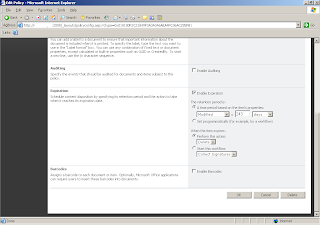
Goto 'Expiration' Section and select 'Enable Expiration' and set the time period and set the action ( what to do when item expires)
Add the ContentType to the Document Library. Add new documents to the library and bind it to our ContentType. When document expires, document will be moved to recycle bin.
2. Using Object Model (see the sample code below)
string policyFeatureId = "Microsoft.Office.RecordsManagement.PolicyFeatures.Expiration";
if (Policy.GetPolicy(contentType) == null)
{
//if the content type hasn't got a Policy yet, create a new Policy Policy.CreatePolicy(contentType, null);
}
Policy policyOfContentType = Policy.GetPolicy(contentType);
policyOfContentType.Name = "My Expiration Policy";
//Add expiration policy to the content type
if (policyOfContentType.Items[policyFeatureId] == null)
{
// Property value => 'Expiration' or 'Modified'
string customData =
@"<data><formula id=""Microsoft.Office.RecordsManagement.PolicyFeatures.Expiration.Formula.BuiltIn""><number>" + expirationDays;
customData += @"</number><property>Modified</property><period>days</period></formula>><action type=""action"" id=""Microsoft.Office.RecordsManagement.PolicyFeatures.Expiration.Action.MoveToRecycleBin"" /></data>";
policyOfContentType.Items.Add(policyFeatureId, customData);
}
Note : we cannot add expiration policy to the core content types.
We can achieve this in two ways
1. Using UI
Goto Site Settings > Galleries > Site Content Types
Select the ContentType for which you want to set the expiration policy and
Click 'Information Management Policy Settings'
Select the option 'Define a Policy' and Click OK, Following screen will appear.

Goto 'Expiration' Section and select 'Enable Expiration' and set the time period and set the action ( what to do when item expires)
Add the ContentType to the Document Library. Add new documents to the library and bind it to our ContentType. When document expires, document will be moved to recycle bin.
2. Using Object Model (see the sample code below)
string policyFeatureId = "Microsoft.Office.RecordsManagement.PolicyFeatures.Expiration";
if (Policy.GetPolicy(contentType) == null)
{
//if the content type hasn't got a Policy yet, create a new Policy Policy.CreatePolicy(contentType, null);
}
Policy policyOfContentType = Policy.GetPolicy(contentType);
policyOfContentType.Name = "My Expiration Policy";
//Add expiration policy to the content type
if (policyOfContentType.Items[policyFeatureId] == null)
{
// Property value => 'Expiration' or 'Modified'
string customData =
@"<data><formula id=""Microsoft.Office.RecordsManagement.PolicyFeatures.Expiration.Formula.BuiltIn""><number>" + expirationDays;
customData += @"</number><property>Modified</property><period>days</period></formula>><action type=""action"" id=""Microsoft.Office.RecordsManagement.PolicyFeatures.Expiration.Action.MoveToRecycleBin"" /></data>";
policyOfContentType.Items.Add(policyFeatureId, customData);
}
Note : we cannot add expiration policy to the core content types.
Subscribe to:
Posts (Atom)
